
Divoom’s catalog looks confusing at first because nearly every product shares the same glowing pixel look. A desk speaker, a wall display and a backpack seem to belong to one odd family, and in a sense they do.
This guide sorts it out. You will find who is behind the brand, how the lineup splits into three groups, what the shared app does, how to match a device to your space and budget, how the flagship display stacks up against LaMetric Time, and what to know about setup, care, shipping and returns.
Everything here comes from Divoom’s own pages and policies, plus independent reviews. Where those sources go quiet, the guide says so instead of guessing.
The Story Behind Divoom
Divoom is a hardware brand, and the company named on its pages is Shenzhen Divoom Technology Co., Ltd. That name points to Shenzhen, China, a city known for consumer electronics, as the base for its headquarters and manufacturing.
On its about page, Divoom traces the pixel art community behind the brand back more than 10 years and describes the company as a slow build. The team writes that it did not expect meaningful products to appear overnight, and that the brand grew gradually on patience, creativity and lasting trust among its members.
Divoom’s pages say little about people or dates. There is no founder portrait and no origin legend, which is why this guide names no founder and gives no founding year. Some numbers circulate elsewhere online, but the brand’s own pages never confirm them, so they are left out here.
A community-first identity
One concrete figure Divoom publishes is about its community. Its community page reports over 3 million pixel designs shared by users in more than 100 countries.
For a new owner, that gallery means the screen never has to start empty. A large catalog of designs is already there to browse.
From one speaker idea to a full ecosystem
Pixel art on a Bluetooth speaker was the starting point. Divoom has since added Wi-Fi panels and an LED backpack, and one app manages every product. The next section shows how the product lines differ.
How the Lineup Breaks Down
Group the products by purpose and three families appear. There are Wi-Fi displays, speakers with pixel screens, and a single backpack. Prices below are rounded regular prices at Divoom, and the whole range runs from about $70 to about $200. The exceptions are the Pixoo-64 II and the Cyberbag, whose prices are best checked live at Divoom.
Wi-Fi pixel displays
These are made for a desk or a wall, and live data reaches them over Wi-Fi. The Pixoo-64 II is the flagship. Its 10.3-inch face holds a 64×64 grid of LEDs, and it can display subscriber and follower counts from YouTube, Twitch and Instagram next to weather, stock tickers and your own artwork. To compare it with the other displays, browse Divoom’s range at its store.
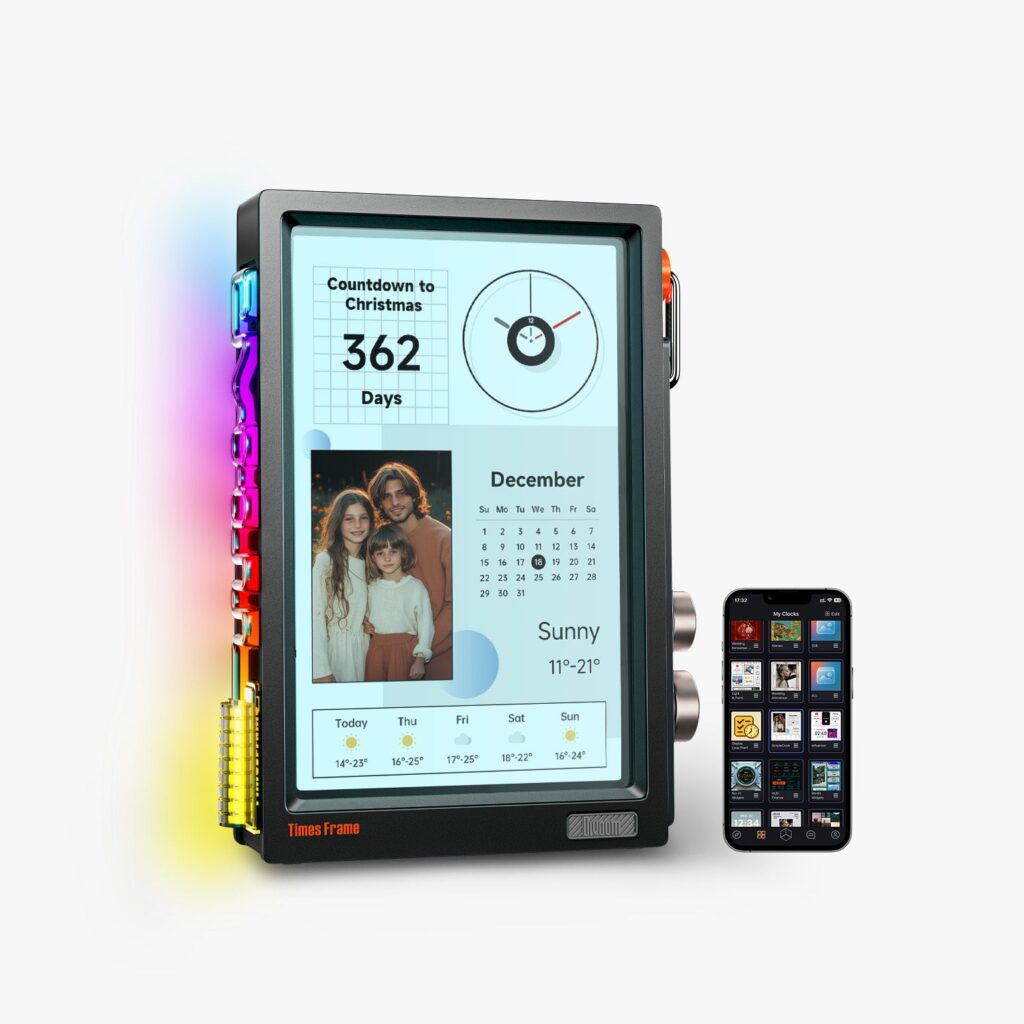
The Times Gate (about $130) works differently. Five little LCD screens sit side by side, which favors quick-glance information over big pixel scenes. The Times Frame (about $200) floats on the desk and is styled like a decorative photo frame.
Speakers with pixel screens
Speakers were where the brand began. The Ditoo-Pro (about $80) combines a 15W speaker, a small DIY LED screen and a retro backlit keyboard. It supports Bluetooth 5.0, USB-C audio, TF cards and an AUX input.
It also includes an FM radio and an alarm clock, plus a Pomodoro timer and white noise for sleeping. That gives it the longest feature list of the speakers covered here.
The Tiivoo-2 (about $86) pairs its speaker with a photo album style display. The MiniToo and the Timebox-Evo (both about $70) are smaller and easier to carry, and the Timebox-Evo uses a 16×16 DIY LED grid.

Independent reviews of the Ditoo-Pro point to a weak microphone and a clunky app. The speaker also has no water or dust protection. For a desk speaker that is tolerable, but it counts against outdoor use or taking calls.
The Cyberbag
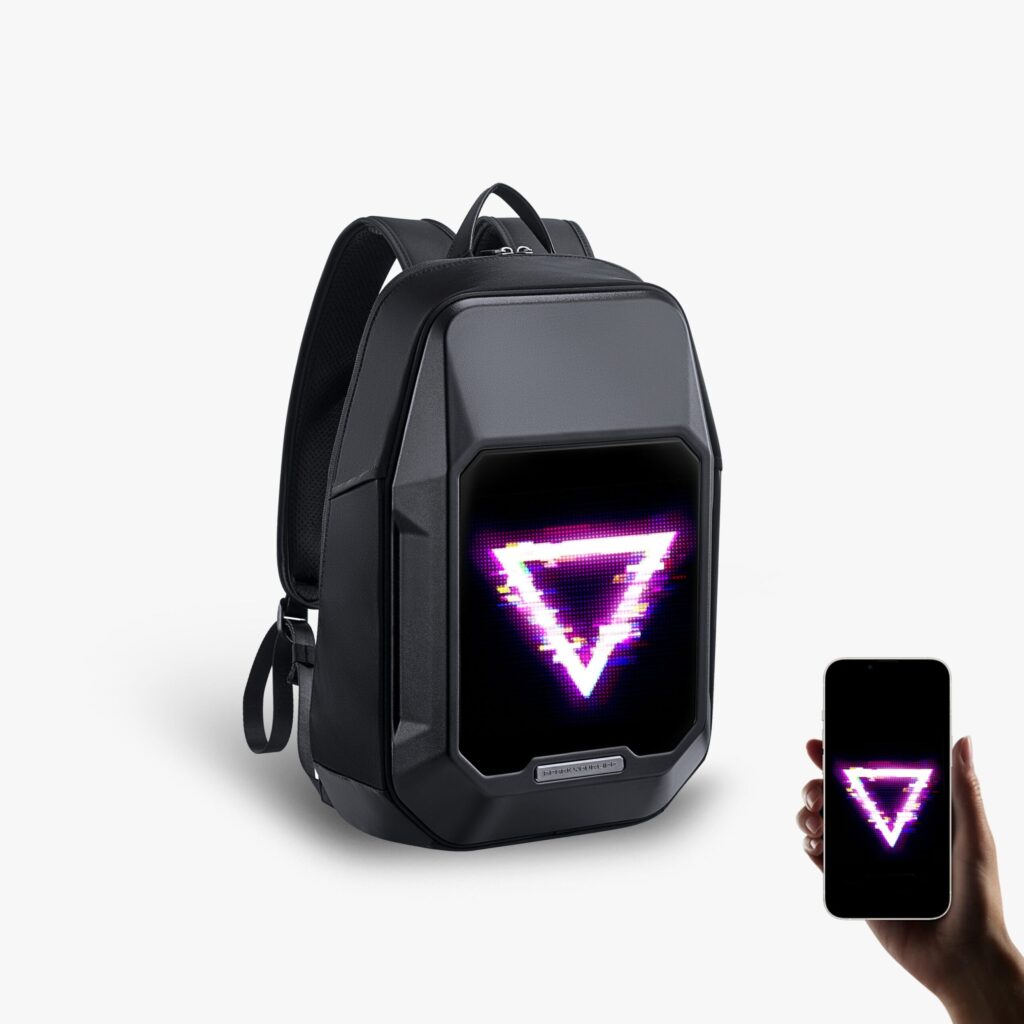
The Cyberbag moves the same LED panel idea onto the front of a backpack. The same Divoom app runs it, and it draws on the shared gallery of designs. It is a smaller category, but it shows how far the brand has stretched the pixel art idea.
One App Ties It All Together
One Divoom app controls every product. It exists for iOS and Android only, so a desktop computer cannot take its place.
The app also opens the community gallery. You can browse other people’s pixel art and animated faces, or share your own, and downloads go directly to the connected device.
How much you need the app depends on the device. Most Divoom speakers still work as ordinary Bluetooth speakers with the app closed. The app becomes essential once you want pixel art, moving animations, custom clock faces or detailed widget settings.
Displays are a different story. Live widgets on the Pixoo-64 II and the Times Gate depend on a Wi-Fi connection, though Divoom’s FAQ says some already-loaded content still appears offline.
The practical upshot is that the ecosystem idea holds up. A design you build or download for one device draws on the same tools and library as any other, so people in one home can combine several devices and still learn only one app. If a phone-only workflow sounds annoying, weigh that before you buy.
Which Divoom Device Fits You
The right pick depends less on budget than on what you want the device to do. Here is a simple way to sort the choices.
For live stats and social widgets
Choose the Pixoo-64 II. Of everything Divoom sells, it alone is designed around live follower counts, and it adds weather and stock widgets on a big 64×64 grid. It needs a power cord and a Wi-Fi connection for those live features.
For a decorative desk piece
The Times Frame leans toward decoration, not data. It floats on the desk like a smart picture frame. It is also the most expensive product in the range, so it fits best when appearance outranks live widgets.
For glanceable information
The Times Gate suits quick, separate readouts such as the time, the weather and notifications. Its five small screens trade away the big animated canvas.
For sound plus pixel art
A speaker beats a display when sound matters. The Ditoo-Pro has the longest feature list, the MiniToo and Timebox-Evo are the smaller, more portable options, and the Tiivoo-2 adds a photo-album style screen.
For pixel art on the move
The Cyberbag is the only wearable option, so it is the one to pick if a desk is not where you spend your day.
A quick budget guide
Around $70 gets you a MiniToo or a Timebox-Evo, and about $80 to $86 covers the Ditoo-Pro and the Tiivoo-2. The Times Gate comes in around $130, and the Times Frame tops the range at about $200. For the Cyberbag and the Pixoo-64 II, check the current price at Divoom.
Before you decide, picture the spot. Decide whether the device will sit on a shelf, hang on a wall or travel with you, and check where the nearest outlet is. Those simple questions narrow the list faster than comparing spec sheets.
Pixoo-64 II Versus LaMetric Time
LaMetric Time is a Wi-Fi pixel clock from another brand, which makes it a useful yardstick for Divoom’s displays. The differences below come from the two brands’ spec sheets.
Where Divoom wins
The Pixoo-64 II offers a much larger canvas. Its 64×64 grid leaves room for detailed animations, whereas LaMetric’s 37×8 strip is built for scrolling text and simple icons.
Divoom also plugs into its community gallery of shared pixel art, so there is a big library to pull from rather than a blank grid.
Where LaMetric wins
LaMetric Time lists for about $200 and includes built-in 2x2W stereo speakers. That lets one device serve as an internet radio, a Spotify Connect speaker and an alarm clock. It also has its own app marketplace, and it connects to Slack, IFTTT, Home Assistant, Google Assistant and Alexa.
Both devices run on external power with no battery, and both connect over Wi-Fi and Bluetooth. LaMetric supports 2.4GHz Wi-Fi and Bluetooth 4.0, while the Pixoo-64 II adds dual-band Wi-Fi. Divoom gives 4GB of onboard storage for its display, and LaMetric does not state a figure publicly.
Which one to buy
If pixel art and social widgets are the goal, the Pixoo-64 II is the better fit. If one device should handle both a small speaker’s job and a smart display’s job, LaMetric’s built-in audio is the deciding factor. For a closer read on the Divoom display, see our full verdict on the Divoom Pixoo-64 II.
Setup and Care Tips
Divoom’s FAQ holds a lot of practical advice in its troubleshooting pages. These are the parts worth following.
Wi-Fi setup done right
A home network is the safest place to set up. Divoom steers owners away from public Wi-Fi, because shared networks in places like airports, hotels, malls, schools and offices often add a browser sign-in that interferes with pairing.
If pairing freezes, the point where it stops is a clue. Around 40% suggests an outdated app, so update or reinstall it. Around 60% suggests a router connection problem, so check the password again, capital letters included. For the Times Frame, the FAQ also recommends WPA2 mode over a mixed WPA/WPA2 setting.
Looking after speaker batteries
Heat is the thing to watch with the portable speakers. Their rechargeable batteries are built in and not meant for home replacement. Divoom’s FAQ says a long listening session on the charger can raise the battery’s temperature, and the battery’s internal protection may then switch on. The guidance leans toward disconnecting a full speaker instead of leaving it on the charger.
Leave repairs to Divoom
Divoom’s FAQ advises against opening or modifying a device at home, warning that a DIY repair risks damage and could put warranty coverage in question. For a genuine fault, the brand’s route is its support team, especially inside the 12-month warranty window.
Pair with one phone at a time
Switching phones takes one extra step, because a Divoom device normally answers to only one phone. Disconnect from the old phone in the app, and the new phone can then pair.
Keep the paperwork
Save the order confirmation and receipt, since Divoom asks for proof of purchase on every warranty claim. The original packaging and all accessories matter too while the 15-day return window is open.
Where to Buy and What to Know About Returns
Verified channels
The simplest route is Divoom’s own store, which carries the brand’s lineup. Select products also appear at authorized retailers. If you buy anywhere other than Divoom’s own site, make sure the seller is authorized.
Why the channel matters
Divoom’s FAQ limits the 12-month warranty to quality-related defects on products it sold directly. A purchase from anywhere else falls outside that direct-sale wording, and buying from an unauthorized seller could mean no obvious way to get warranty support.
Spotting a risky listing
- Set the listing’s price next to the one on Divoom’s own store. A figure far under it deserves suspicion.
- Make sure the seller is an authorized Divoom seller, not a generic third-party account.
- Hold on to your order confirmation and receipt in case you need warranty help.
Returns and warranty
Divoom accepts returns of unused products for 15 days after delivery, as long as every accessory and the original packaging come back too. Returns that fail those conditions may be turned down.
When the return is not about quality, the buyer pays the postage. A defect changes that: Divoom supplies a prepaid label and sends either a refurbished or a new unit, whichever is available.
The warranty lasts 12 months and covers quality-related defects on items bought directly from Divoom. A replacement unit carries the longer of two periods: what remains of the original coverage, or three months starting on the replacement date.
Shipping
Divoom says an order is processed inside 48 hours, not counting weekends and holidays. Anything placed after 1 PM Pacific goes out on the following business day. In the US and Europe, parcels typically arrive in two to five working days through UPS, USPS or DHL, and standard delivery there is usually free.
Outside those regions, standard shipping takes seven to 15 working days, with expedited options trimming five to 10 days. Shipping outside the US and Europe is charged by size, weight and destination.
Questions Buyers Ask
Who makes Divoom?
Divoom is a Shenzhen hardware company. It makes Bluetooth speakers with pixel screens, Wi-Fi display panels and one LED backpack, and a single app and gallery serve them all.
Do Divoom speakers work without the app?
Mostly yes. They play music over Bluetooth like any other speaker, and the app matters only for pixel art, animations, clock faces and in-depth widget tuning.
Can I control a Divoom device from a computer?
No. Only phones and tablets are supported, and there is no Windows or Mac edition.
Why does Wi-Fi setup freeze at 40%?
The FAQ’s usual explanation is an outdated app. Install the latest version, or reinstall the app if the freeze keeps happening.
What does a freeze at 60% mean?
It usually points to a router connection issue. Recheck the Wi-Fi password, including capital and lowercase letters.
Can two phones share one Divoom device?
Not at the same time. One phone is paired at once, so release the first phone in the app before you connect the second.
Can I swap the battery in a Divoom speaker?
No. The rechargeable cell is built in, and Divoom does not design it to be changed by the owner.
How long is the Divoom warranty?
Twelve months, for eligible quality defects on products bought straight from Divoom. Every claim needs proof of purchase.
How fast does Divoom ship?
US and European orders typically arrive in two to five working days from local warehouses, and standard shipping is usually free there. Elsewhere, delivery takes seven to 15 working days and shipping is charged.
How long do I have to return something?
Fifteen days after delivery, for unused items sent back with every accessory and the original packaging. Postage is the buyer’s responsibility unless the cause is a quality defect.
Final Thoughts
Divoom works best when you pick by purpose. Choose the Pixoo-64 II for live stats, the Times Gate for glanceable readouts, the Times Frame for looks, a speaker for sound and the Cyberbag for pixel art on the move.
Whichever device you choose, set aside time for the app, buy from Divoom’s verified channels and keep your receipt and packaging while the return window is open. The brand’s prices run from about $70 to about $200 at Divoom, so check the current price before you order.