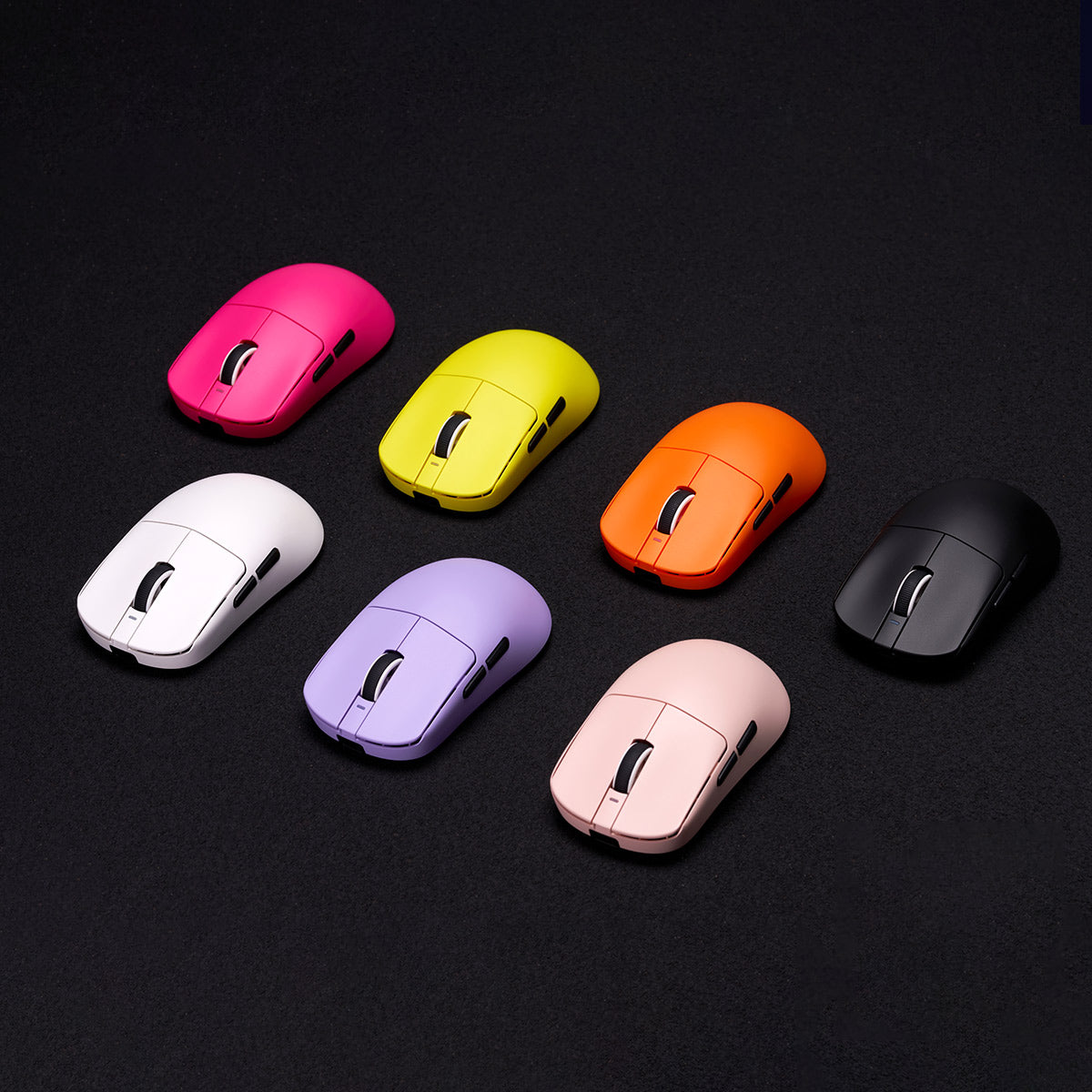
At first glance the ATK VXE Dragonfly R1 range is hard to read. Five mice share a single shell, and the names differ by only a tag: S, SE+, plain R1, Pro and Pro Max.
What separates them is hidden inside: which sensor, which wireless chip, how big the battery is, what switches sit under the buttons, and whether Bluetooth made the cut. This guide works through those choices in an order that trims the shortlist quickly, so you can match a model to your hand, your games and your desk.
Everything here comes from the brand’s own spec sheets and descriptions, plus the results of an independent lab test on the R1 Pro. I haven’t handled these mice myself, so you’ll see “the brand says” wherever a claim comes from the maker.
ATK and VXE: Who Is Behind the Mice?
ATK is a newer name in gaming peripherals. The brand’s official store names ATK GEAR GLOBAL LIMITED as its operator, with a registered address in Hong Kong’s Sheung Wan district. US trademark filings for the ATK GAMING GEARS and VXE GAMING GEARS names both point to Shenzhen Yizhita Technology Co., Ltd.
VXE works as a sub-brand with a separate storefront on vxe.com. Its catalog includes the Dragonfly R1, V3 and X3, and the MAD R. A third name, VGN, also comes up. The independent lab calls VXE and VGN sister brands, and it found the VXE R1 Pro and the VGN Dragonfly F1 Pro Max nearly identical in performance. In practice, the ATK and VXE labels point to the same product family.
For everyday buyers, software is the milestone that counts most. ATK offers a web-based ATK HUB driver, and it says the platform serves more than 8 million monthly active users. Treat that as the company’s own claim.
The material behind this guide gives no founding year, so none is stated here. ATK does publish a brand timeline. It places the first Dragonfly R1 in late 2023, next to the ATK68 Hall Effect keyboard, and the R1 later reached Japan under the ATK Gaming Gear name.
The range widened fast from there. The timeline lists the V75, V75 Pro and Z87 keyboards, a headset, another keyboard, the Dragonfly A9 mouse, a controller and a second headset.
Esports is another focus, VALORANT in particular. ATK’s About page lists partnerships with the VALORANT division of Wolves Esports and with Leviatán Esports, and ATK says it named Aspas as its global brand ambassador. Sponsorships say little about mouse quality, but they show a company investing in its image.
Five Models, One Shell
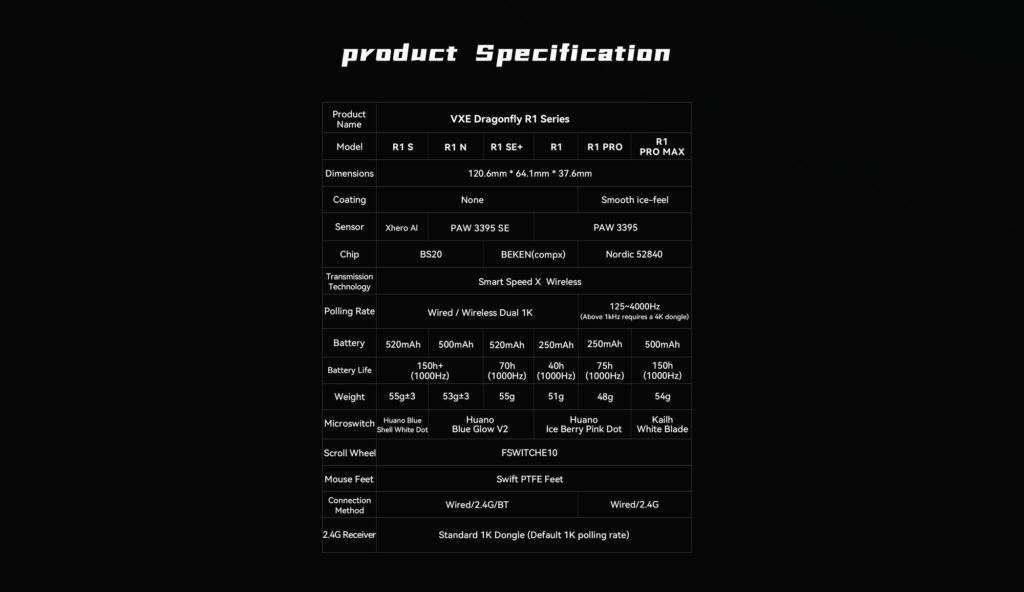
All five models are built on one symmetrical body of roughly 120.6 by 64.1 by 37.6 mm. The variation is in the electronics, the switches and the battery.
| Model | Bluetooth | Rated battery | Weight | Sensor |
| R1 S | Yes | 150 hours | 55g ±3g | Xhero AI |
| R1 SE+ | Yes | 70 hours | 55g | PAW3395 SE |
| R1 | Yes | 40 hours | 51g | PAW3395 |
| R1 Pro | No | 75 hours | 48g | PAW3395 |
| R1 Pro Max | No | 150 hours | 54g | PAW3395 |
Battery figures are the brand’s ratings at 1000Hz polling.
If the Pro Max is already on your shortlist, our full verdict on the ATK VXE Dragonfly R1 Pro Max goes through it spec by spec.
Choose Your Connection Mode
Connection type is the quickest filter. Bluetooth 5.4 is available on the R1, the R1 SE+ and the R1 S, which also offer the 2.4G receiver and a USB-C cable. The two Pro models drop Bluetooth and give you the receiver and the cable only.
Why does that matter? The independent lab notes that a mouse without Bluetooth can hold only one connection at once. If one mouse has to serve both a laptop and a desktop, or you’d rather keep a thin laptop’s USB port free, favor the three Bluetooth models.
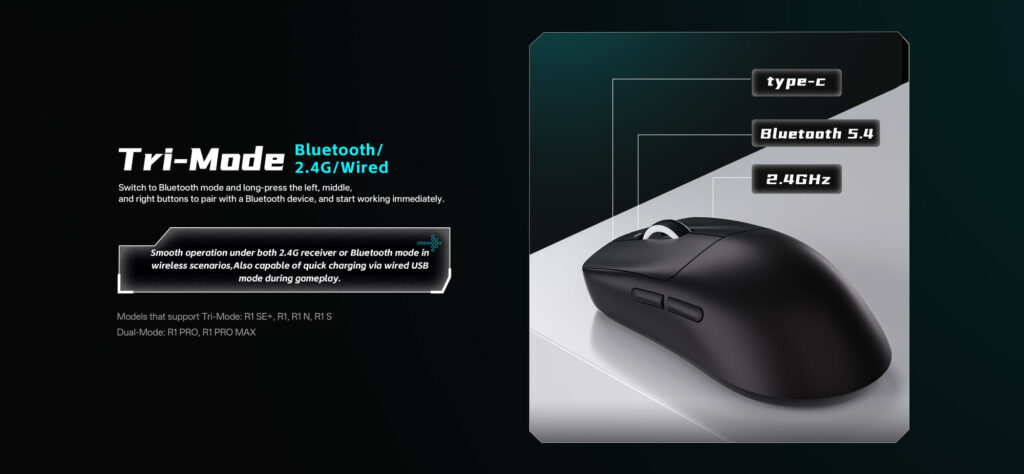
Someone whose mouse lives on one desktop loses nothing with dual-mode. Both Pro models ship with a receiver extender, and placing the receiver on it near your mousepad shortens the wireless path. On a Mac, a Pro Max still works through the receiver or the cable.
Sensor, Chip and Polling Explained
Sensors and DPI
A sensor reads the surface under the mouse and turns your hand movement into pointer movement. Three of the five models carry the PixArt PAW3395: the R1, the R1 Pro and the R1 Pro Max. ATK’s published ceiling for it is 26,000 DPI, with 650 IPS and 50G. The R1 SE+ gets the cut-down PAW3395 SE, listed with an 18,000 DPI ceiling, 400 IPS and 40G.
The R1 S relies on a sensor ATK calls Xhero AI. The brand gives only a wide adjustment range and no hard ceiling, so a direct comparison isn’t possible.
Three terms come up in every spec line.
- DPI: how far the pointer travels for each inch you move the mouse.
- IPS: the top swipe speed the sensor can keep tracking.
- G: the peak acceleration it can follow.
Extra headroom in those figures matters mainly for large, fast swipes at low sensitivity. ATK’s four preset DPI stages (400, 800 as the default, 1600 and 3200) sit far below either ceiling and can be cycled without software, so on paper the gap between the two sensors has little room to show.
Chips and polling rate
Think of the chip as the control center: it manages the wireless link and sets the reporting rate. A Nordic 52840 powers the Pro and Pro Max, and it supports 125 to 4000Hz. A BEKEN (CompX) chip sits in the R1 and SE+, while the S uses a BS20 that ATK calls self-developed. Those three stop at 1000Hz.
Polling rate means how often each second the mouse reports its position to the PC. At 1000Hz that is once per millisecond, and 4000Hz quadruples it.
There is a catch. The Pro Max, like the Pro, comes with a standard 1K receiver, and ATK states that a 4K dongle is a separate purchase if you want anything above 1000Hz. So the “4K” label describes the chip’s ability, not the contents of the box.
Is it worth buying? The independent lab tested the R1 Pro, which has the same sensor and chip as the Pro Max. At 4000Hz it saw a slight gain in latency and consistency but judged it too small for most players to notice, and it rated the click and sensor latency superb. The extra receiver makes most sense for competitive shooter players whose monitors run at a high refresh rate.
Switches, Coating and Battery
Switches
Switches sit under the main buttons. They shape the click and, on paper, how long it lasts.
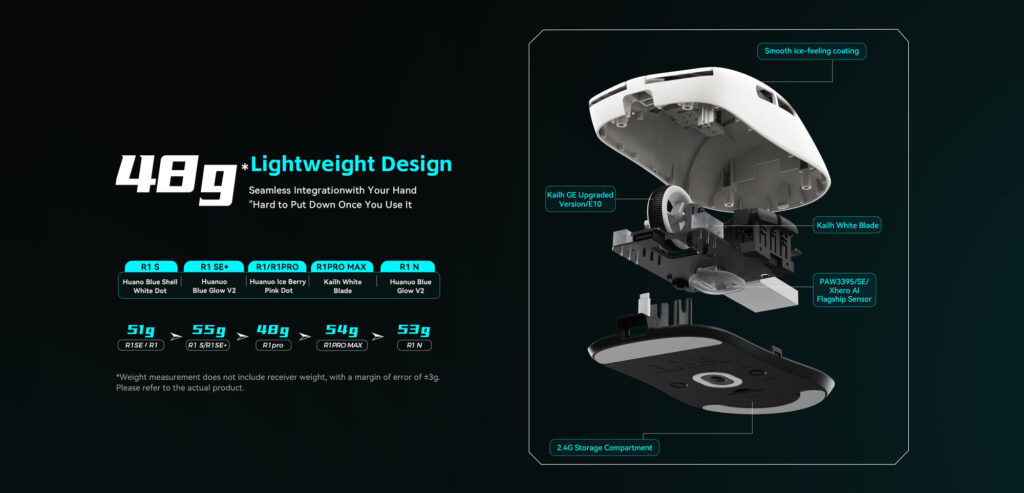
- R1 Pro Max: Kailh White Blade, a 100 million click rating, balanced and crisp by ATK’s description.
- R1 and R1 Pro: Huano Ice Berry Pink Dot, a 90 million click rating and a softer bounce.
- R1 SE+ and R1 S: Huano Blue Glow V2 and Huano Blue Shell White Dot respectively, with no click rating published.
All five use the same scroll wheel encoder, an FSWITCH E10, so the wheel hardware doesn’t change between models.
Coating and weight
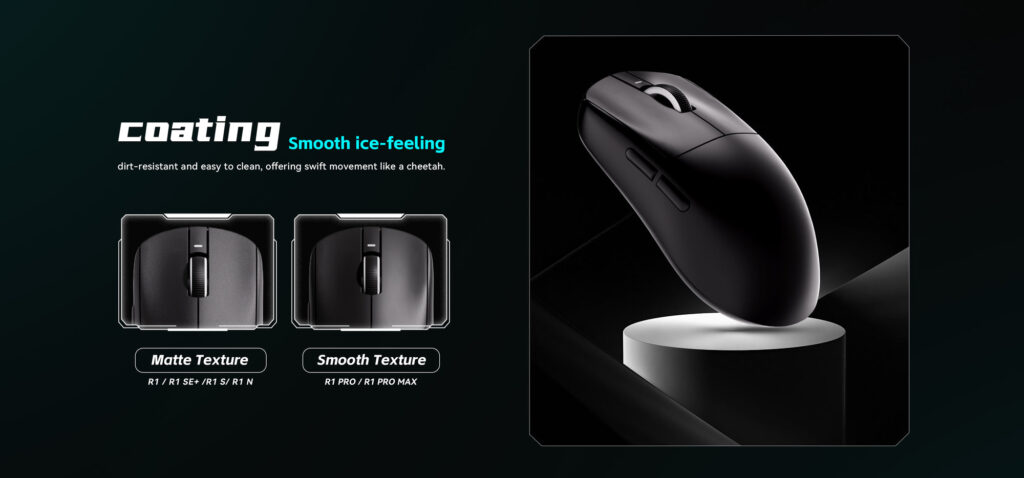
A smooth coating that ATK calls ice-feel is exclusive to the Pro and Pro Max. The brand calls it dirt-resistant and easy to clean, and the lab found it smooth with a slight increase in grip when hands sweat. The remaining three models are matte.
The lightest model is the R1 Pro at 48g, and the heaviest are the SE+ and S at 55g. The lab weighed its R1 Pro at 48.8g, near the brand’s figure. The Pro Max reaches 54g because of its larger cell.
Battery
Battery varies more than any other spec. Rated runtimes are 150 hours for the R1 S and Pro Max, 75 for the Pro, 70 for the SE+ and 40 for the R1. The cells are 250mAh in the R1 and Pro, 500mAh in the Pro Max and 520mAh in the S and SE+.
Treat every figure as a best case. ATK measures them at 1000Hz, and higher polling rates draw more power. Anyone who hates charging should look at the S or the Pro Max, the two rated for 150 hours. Anyone who counts grams will prefer the Pro, which trades runtime for the lowest weight.
How the Pro Max Compares With Logitech
The Logitech G Pro X2 Superlight is the obvious premium rival, and the two split the spec sheet between them. Logitech takes the headline numbers: its HERO 2 sensor is listed at up to 44,000 DPI and 888+ IPS, and it supports polling up to 8kHz.
The ATK takes the other column. It is six grams lighter at 54g against 60g, and its rated battery of up to 150 hours compares with up to 95 hours on retailer spec sheets for the Logitech.
Switch ratings lean the ATK’s way too, at 100 million clicks for the Kailh White Blade against 70 million, but the figures don’t compare cleanly because Logitech’s hybrid optical-mechanical switches work on a different principle. Neither mouse has Bluetooth, and both connect wirelessly or by cable.
In price tier, the Pro Max is the budget-friendly choice and the Logitech is the premium one. Choose the ATK for lower weight and a longer rated battery, or the Logitech when a higher polling ceiling matters more.
Where to Buy and What Coverage You Get
The mice sell through atk.store, vxe.com and Amazon, and the terms differ by store. This section sticks to policy, since prices and stock change often.
Warranty terms
Both official stores give 12 months, and each limits the cover to orders placed on its own site. ATK’s warranty is for manufacturing and workmanship defects. VXE’s limited warranty is similar, but it leaves out bundled accessories such as cables and can’t be transferred to another owner. VXE’s terms also exclude normal wear, accidents, misuse and unauthorized repairs, and its support aims to reply within 24 hours on weekdays.
Faulty on arrival or soon after
Both stores run a 30-day window for quality or functional problems, and both want video evidence of the fault. At atk.store the remedy is a refund or an exchange. At vxe.com, support tries to solve the problem first, and if that fails you choose between a full refund with return shipping covered and an exchange.
After day 30, a vxe.com claim normally means sending the mouse in for inspection at your own expense. If VXE confirms the defect, it ships a replacement and pays for that shipment.
Ordinary returns at atk.store
ATK’s standard return policy is the stricter route. Random returns aren’t accepted, and a request has to arrive within 7 days of delivery, with tracking confirming the date. The mouse must show no obvious wear or damage, and it goes back in its original packaging with every accessory, any gifts and proof of purchase.
You pay the return shipping, and the original shipping fee isn’t refunded. Approved refunds go back to the card or account you paid with within 10 business days.
Shipping from atk.store
| Stage | Typical time |
| Dispatch to the US | 1 to 3 business days, up to 15 in busy periods |
| Standard transit | 3 to 16 business days |
| DHL Express | 1 to 4 business days, at extra cost |
The shipping cost is worked out at checkout from the destination, weight and method.
Other retailers, including Amazon
Neither brand’s 12-month cover extends to purchases made elsewhere. ATK’s return policy points those customers back to the retailer they bought from, so read that store’s terms before ordering and keep your order details. To compare options, check the ATK VXE Dragonfly R1 Pro Max on Amazon; the link opens Amazon in a new tab.
Checking that your mouse is genuine
A few free checks help you confirm what arrived. Begin with the box. A Pro or Pro Max should hold a 1K receiver, a USB-C cable, a receiver extender, spare mouse feet, grip stickers, a manual and a service card, while the other three models come with the receiver, cable, manual and card only.
Next, measure and weigh the mouse: every R1 should match the shared dimensions listed earlier, and a Pro Max should weigh about 54g. Then look at where it came from. An unfamiliar seller isn’t proof of a fake, but it can put you outside ATK’s support. Finally, install the ATK HUB driver only from the link on atk.store, never from an unknown site.
Care and Setup Tips
A few habits suit any light wireless mouse, and several of them line up with what the brands’ warranty terms say.
Software and setup
The R1 series is configured through V HUB, part of ATK’s HUB platform, which also comes in a web-based version that runs in a browser. In it you set DPI, polling, macros and button mapping. Check for driver updates from time to time.
Receiver and charging
Underneath the mouse sits a compartment for the 2.4G receiver. Use it whenever the mouse goes in a bag, because a lost receiver leaves you with a wired-only mouse.
Charging runs through the supplied USB-C cable, and the mouse also works in wired mode while it is plugged in. Rated battery figures assume 1000Hz polling, so expect shorter runs at higher rates. Keep the mouse away from heat such as a sunny windowsill or a parked car, since VXE’s warranty wording excludes damage from high heat.
Feet and grip
The PTFE feet glide best over a clean mousepad. The Pro and Pro Max boxes include a spare set of feet for when the originals wear down, along with grip stickers that add traction if your hands sweat, without changing the shape much.
Cleaning
Switch the mouse off and unplug the cable before cleaning. A soft, barely damp microfiber cloth is enough for the shell, and it should be dried straight away, including around the button seams and the wheel opening. Don’t put liquid straight onto the mouse, and avoid harsh chemicals, because VXE’s warranty wording excludes damage from corrosive substances.
Dust and crumbs near the wheel opening are best kept off the desk, and the shell should stay closed: VXE’s warranty wording treats unauthorized repairs as grounds for voiding coverage. If something does fail, record a short video straight away, because support at both brands asks for one.
Frequently Asked Questions
Does the Pro Max support Bluetooth?
It doesn’t. The Pro and Pro Max connect by 2.4G wireless or USB-C. If you need Bluetooth, the plain R1, the SE+ and the S have it.
What is the difference between the R1 Pro and Pro Max?
Both use the same body, the same sensor and chip, and the same finish. The Pro Max adds a battery twice the size, up to 150 hours against 75, plus Kailh White Blade switches, at the cost of 6g more weight.
Will it fit my hand?
The brand says the shape suits small to medium hands. The independent lab called the symmetrical shape versatile across hand sizes and grip types. If you have large hands, compare the dimensions above with a mouse you already use.
Which R1 Should You Pick?
Use the shortlist below, and remember that all five share one shell, so the shape is the same across the family.
- Need Bluetooth: pick from the R1, SE+ or S.
- Want the full PAW3395 plus Bluetooth: the plain R1 is the only model with both.
- Want the longest battery: the S and the Pro Max are both rated for up to 150 hours.
- Want the lowest weight for shooters: the Pro, at 48g.
- Want the big battery and the higher-rated switches: the Pro Max.
If the Pro Max is your pick, you can look up the R1 Pro Max on Amazon, which opens Amazon in a new tab. Whichever you choose, buy from a store whose return terms you understand and keep your order details.