
Smart home gear gets expensive fast, and many shoppers end up weighing a premium name against a catalog they do not fully understand. MOES falls into the second group. Its store lists well over a hundred products, and the switches alone come in more than thirty variants once you count gangs, protocols and wiring needs.
This guide takes the choices in the order they matter: what the brand sells, which wireless protocol fits your home, how to check your wiring, which products cover which jobs, and how to set up and buy with confidence. It draws on MOES’s own pages and policies, so treat it as research and not a lab test.
If you only want the short version, settle on a protocol first, look for a neutral wire before you order anything, and favor the better-reviewed products in each category.
What MOES Sells
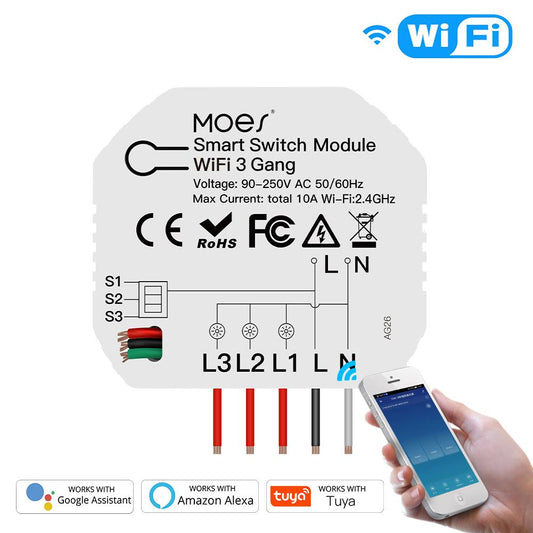
The heart of the catalog is switches and modules. Expect wall switches, scene controllers, dimmers, fan controls and DIY relay modules that retrofit older wiring. WiFi, Zigbee and Matter editions exist for most of them, and a number are designed for homes with no neutral wire.
Past switches, you will find curtain and blind motors, thermostats, smart sockets, door locks, cameras, bulbs and a line of carbon monoxide and gas detectors. Judging by the site layout, the range began with switches and relay modules and grew outward from there.
Gas detection is the part of the range that looks newest. The store gives detectors a tab of their own in the main navigation, where you might have expected them under a general sensors heading. Price is the headline for the whole range. Switches generally cost about $20 to $37, and relay modules start around $8.
Where MOES Comes From
MOES says it has been designing and building smart home devices for more than five years. The stated mission is modest: offer everyday households a low-cost entry to home automation, minus the premium-brand markup.
In its own words, MOES works from four principles: respond to what customers actually need, keep installation within reach of DIYers, make a smart lifestyle pleasant to live with, and tackle ordinary household annoyances before novelty features. The pitch is plain, and it fits a catalog full of switches and relays.
The brand also reports over 400,000 active users spread across more than 100 countries, and it cites over 100 distributors worldwide. Those are its own figures and they are not independently audited. The store itself shows about 390 product reviews in total across the catalog.
A Tuya brand, not a closed ecosystem
MOES is sometimes described as a Tuya OEM brand. Its hardware plugs into Tuya’s established cloud instead of a MOES-built one, and day-to-day control happens in the Tuya or Smart Life app. The arrangement keeps costs low and gives access to a big device ecosystem.
The trade-off shows up in advanced setups. Pairing MOES gear with Home Assistant or running it fully locally takes more configuration than a plug-and-play brand such as Aqara would. Buyers who only want to tap an app or speak to a voice assistant will rarely notice. Anyone aiming for a home that works without the cloud should weigh it.
WiFi, Zigbee or Matter
The same switch shape often comes in three protocol versions, so the real choice is how the device talks to the rest of your home.
WiFi: no extra hardware
A WiFi model joins your router the way a phone or laptop would. You skip the hub, and the Tuya or Smart Life app handles pairing.
Each one does count as another client on that router, so a dozen or more switches can overload a basic model. That makes WiFi a comfortable pick for one room or a first purchase.
Zigbee: a mesh for bigger homes
Zigbee devices connect to a gateway and pass signals along for each other, which builds a mesh that grows without touching your WiFi.
Automations that run through a local hub generally respond faster, so Zigbee suits a whole-house plan. The catch is that a compatible gateway has to be in place first.
Matter: one device, many platforms
Matter is the newest of the three, and it aims to let one device work natively with Apple Home, Google Home, Alexa and SmartThings without bridging apps. Most MOES Matter products still use WiFi as the radio, so the router concerns above remain.
What changes is the software side, with fewer separate apps and less lock-in. Whichever you choose, a simple habit helps: start with one room, confirm it works, then expand.
Choosing a Switch for Your Wiring
Ordering the wrong variant typically ends with a return, so a few quick checks before you buy are worthwhile.
Look for a neutral wire
Start with the breaker off and the wall plate removed. Inside the box, white wires twisted together and capped, separate from the switch, indicate a neutral. When every conductor in there lands on the switch, assume the box has none.
Photograph the wiring before you disconnect anything, and confirm with a non-contact voltage tester that the power is really off, since a breaker label can mislead.
For boxes without a neutral, MOES sells dedicated versions, such as a WiFi glass-touch model at about $20. A neutral-required switch will not install in such a box, so this check decides which version to order.
Count your gangs
Each switch position on a wall plate is one gang, so a plate with three toggles is a three-gang plate. MOES makes its Star Grand Series in one to four gangs, each rated at 10A. Buy to fit the plate you have, because reworking the wall box takes far more effort than changing a switch.
Choose the protocol
If you are buying one switch to start, WiFi or Matter is the easier route. MOES lists a Star Grand Series Matter switch at about $36 with built-in Matter support, so it works with Apple Home, Google Home, Alexa and SmartThings, and you can browse MOES’s switches at the MOES store to find it. A house full of switches and sensors is where Zigbee repays the cost of a gateway.
Consider scene switches
MOES’s Star Feather Series, about $35 for WiFi and about $37 for Zigbee, adds scene control to the usual on and off. A single press can fire a whole lighting scene. People who already run scenes in other rooms get something for the extra few dollars; everyone else can skip it.
Weigh the reviews
Reviews on MOES’s store are unevenly spread. A few switches have plenty, while many show one or none, so check the count on the product page before choosing. If two similar models are priced about the same, the one with more feedback on its page gives you more to go on.
Products Worth a Look
With well over a hundred products, it helps to start from the problem you want to solve. These seven cover the main jobs MOES hardware does, from switching lights to gas detection.
Star Grand Series Matter WiFi Smart Switch
A full-touch panel switch at about $36. MOES rates it for 10A per gang, says it was tested for more than 100,000 cycles, and builds in native Matter support. More than 80% of the reviews on its MOES product page are five-star.
Star Feather Series Smart Switch
A combined light and scene push-button switch at about $35 for WiFi, with a Zigbee edition at about $37. One button runs the light and a second fires a scene.
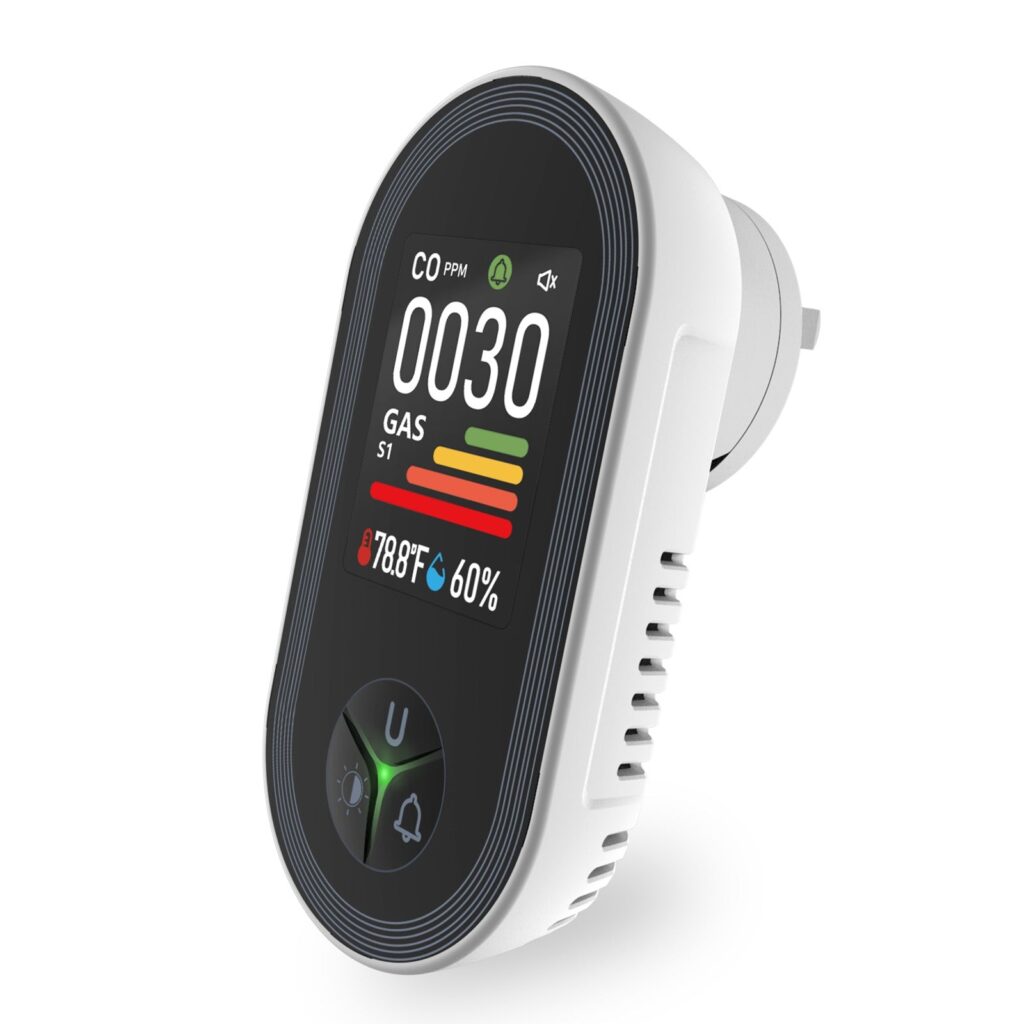
4-in-1 Carbon Monoxide and Natural Gas Detector
A plug-in unit that needs no app; check the current price at MOES. It reads carbon monoxide, combustible gas, temperature and humidity, and it flags rising levels with a four-stage color scheme on its screen. For the specs, placement and owner feedback in detail, read our full verdict on the MOES PTH-24E gas detector.
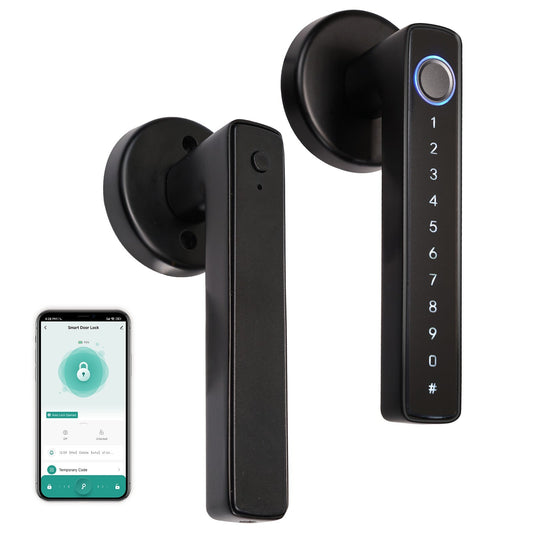
Fingerprint Door Lock
MOES’s top-tier lock, at about $130, pairs fingerprint entry with a passcode backup over WiFi and Tuya. It is the most expensive item among these seven, and the reason is scope: it takes the place of an entire deadbolt, where the other picks add a module to what you already have.
BLE Smart Sprinkler Water Timer
A Bluetooth irrigation timer starting around $40, with a rain-delay setting, plus a built-in filter washer. It is aimed at anyone who wants scheduled watering without building a smart-hub setup.
No-Neutral Wire Smart Light Switch
A WiFi glass-touch panel at about $20, made for older housing. It is the model to look at when your box has no neutral wire.
Matter WiFi E27 Smart Edison Bulb
A 16-million-color RGB bulb with native Matter support and a standard E27 base, at about $19. It needs no wiring at all, which makes it a low-effort first item to try.
MOES Compared With SONOFF
SONOFF is a budget brand that sells low-cost relays and switches to the same DIY crowd, which makes it a natural point of comparison. The two overlap, but they are not twins.
Price
Both brands sit in the budget tier. MOES switches typically cost about $20 to $37, with relay modules from about $8, and SONOFF’s wall-relay modules land in a similar range. Neither is cheaper across the board; the differences show up product by product.
App and ecosystem
This is the biggest practical difference. Most MOES devices run through Tuya or Smart Life, while SONOFF runs on its eWeLink platform, which offers partial local control for some devices. Neither gives you a fully local setup straight away.
Tinkerers get more from SONOFF here, since its community is stronger around Home Assistant and custom firmware. MOES offers the reach of Tuya’s device catalog as its counterweight.
Build quality
Independent comparisons generally place both brands at average build quality, somewhat under premium names like Aqara, since price comes first for each. On the MOES side, the brand says the Star Grand Series was tested for more than 100,000 cycles and rates it at 10A per gang.
Range
MOES’s catalog reaches into curtain and blind motors, high-current relays, floor and radiator thermostats and plug-in gas detectors. SONOFF is stronger in wall relays, WiFi range extension and retrofit hardware for buyers who are comfortable with wiring.
Which to buy
Pick SONOFF if you want tight Home Assistant integration and mostly need wall relays. Pick MOES if you want gas detection, curtain automation or other categories under one brand, or if you are retrofitting a home with no neutral wires.
Setup and Care Tips
When a MOES device misbehaves right after installation, the cause is more often the app, the WiFi or a missed step than the hardware itself. These habits head most of that off.
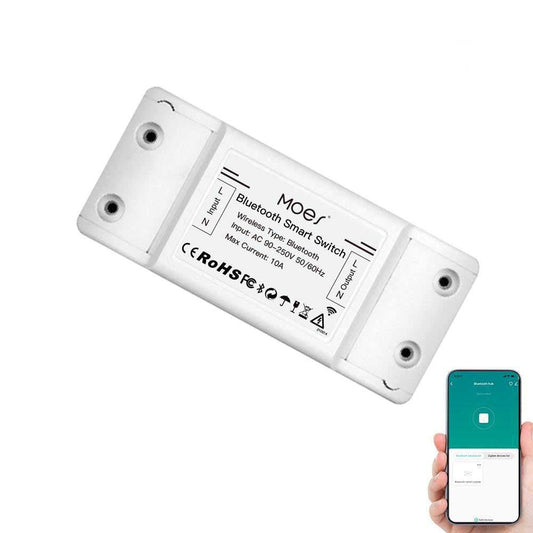
Use the right app
Pairing happens in Tuya or Smart Life, and there is no dedicated MOES app. Typing the brand name into an app store can send you to an unrelated listing, and pairing through the wrong app will fail even though the device is fine. The included manual names the right one, so read that line first.
Switch off the breaker first
This applies to every switch and relay module. A non-contact voltage tester shows whether the circuit is really dead, which a breaker label cannot promise, especially in an older house. Jotting down which breaker feeds which room as you go saves time later.
Mind your WiFi signal
WiFi models rely on a steady link to the router. If one keeps going offline, weak signal is the first thing to suspect, particularly in a basement, a garage or the far end of the house, where a repeater is worth adding before you doubt the switch.
Test plug-in detectors
A plug-in MOES detector needs no pairing, yet it still deserves a check on day one. Models with a manual test button let you press it once and listen for the alarm while watching the screen. The wall-power-plus-battery design also means the backup battery should be looked at every few months, as with a smoke detector.
Keep the app and firmware current
Tuya pushes firmware updates to connected devices every so often. Deleting the app after setup means missing them, so keep it installed and open it occasionally, which also smooths things when you add another device later.
Know when to use the warranty
Some symptoms go beyond troubleshooting: a switch that still refuses to pair after a factory reset, or a detector whose screen stays dark with fresh backup batteries. Those suggest a hardware fault, and the 2-year warranty exists for that case.
Buying From the Right Seller
MOES says it works with more than 100 distributors, and its products turn up on general marketplaces as well. More sellers leave more room for a mislabeled, discontinued or wrong-region item to slip through.
Buying from MOES’s own store leaves no doubt about who stands behind the order, so the 60-day return window and the 2-year warranty are easy to invoke. The store’s regional versions also make it simpler to pick the right plug type and voltage for your country.
Region matters because wiring standards differ, notably in how neutral wires are handled, which is why MOES keeps separate US and EU collections. A 120V no-neutral switch made for US homes will not stand in for a 230V European one, and the same goes the other way.
If you buy from another seller, ask these questions first.
- Is the exact MOES model named, or only a generic label such as a Tuya-compatible smart switch?
- Does the listing give the voltage and plug type, or at least the region it suits?
- Is the price far below the MOES store for the same model and gang count?
- Does the seller publish its own returns policy, apart from the marketplace’s general terms?
A steep gap between a listing and the MOES store is a cue to compare model numbers before you buy.
Shipping, Returns and Warranty
Shipping
MOES waives standard shipping charges on orders above $29.90 in most countries, though remote regions are excluded; below that amount the fee is $5. Orders above $299 get free fast or DDP shipping in most countries as well. Customs duties and import taxes are the buyer’s to pay and are not built into listed prices.
MOES says orders are checked and packed within 24 hours. Parcels usually leave China, with regional warehouses used when stock allows. Standard e-Packet delivery to the US is typically quoted at 7 to 21 business days, with DHL and FedEx as paid upgrades.
Returns
Returns are accepted for 60 days after delivery. MOES can turn down an item that has been used or damaged, or that no longer has its original packaging. The first step is an email to MOES, which answers with a link that starts the return, so nothing needs to be mailed back without notice.
After approval, expect the refund on the card or account you paid with within roughly 3 to 5 business days.
Warranty
The 2-year warranty runs on its own track. Reach for the return window when you change your mind or the item turns out not to fit, and for the warranty when a hardware defect appears afterward.
Common Questions
Can I control MOES switches by voice?
Yes. Alexa and Google Assistant both work with the switches, and the control runs through the connected app.
Does my switch box need a neutral wire?
Not always. Some MOES switches need one and others are designed without it, so look inside the box before choosing a model.
Is the gas detector app-connected?
No. The 4-in-1 plug-in detector runs by itself, using its own screen and alarm rather than an app.
Does MOES ship worldwide?
Yes. Most destinations qualify for free standard shipping on eligible orders, while a smaller number of remote regions pay extra. Tracking is available through the link in the confirmation email or on the site’s order-tracking page.
Which payment options are available?
Customers can pay with PayPal or a credit card.
Can I cancel after ordering?
Only while the order is still unshipped. Contact MOES by email or phone.
What if I mistype the shipping address?
MOES reaches out by email or phone to correct it. Watch your inbox for the first day, since the fix needs to happen before dispatch.
Whichever product you pick, match it to your wiring and your protocol first, and the rest of the setup tends to go smoothly.